LTE FDD
For Waveform Playback (ARB) capability.
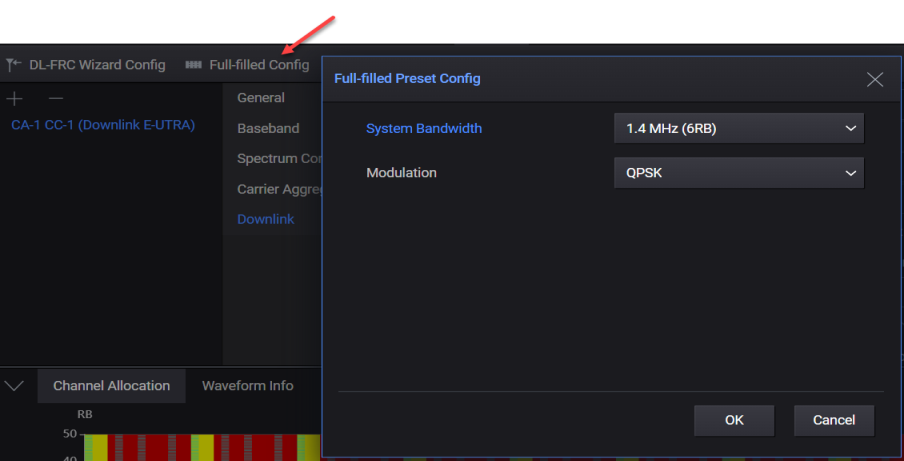
The Full-filled Config button is displayed when a Downlink E-UTRA carrier is added. Clicking this button opens the Full-filled Preset Config dialog that allows you to set the channels with fully filled DL-SCH configuration.
|
SCPI Command |
[:SOURce]:RADio:LTEFdd:WAVeform[:ARB]:CCARrier<n>:DLINk:CONFig:FFILled <string> |
|
SCPI Example |
RADio:LTEFdd:WAVeform:CCARrier:DLINk:CONFig:FFILled "SystemBandwidth:B10M,Modulation:QPSK" |
|
Notes |
Sets only (Immediate Action) |
|
Preset |
Refer to the element definition of the data part below. |
|
State Saved |
No |
|
Range |
Refer to the element definition of the data part below. |
|
Initial S/W Revision |
A.20.01 |
The preset value is same as the default value of each setting definition.
|
Settings |
Symbols in the data part |
Values in the data part |
Preset values |
|
System Bandwidth |
System Bandwidth |
B1M4 | B3M | B5M | B10M | B15M | B20M |
B10M |
|
Modulation |
Modulation |
QPSK | QAM16 | QAM64 | QAM256 |
QPSK |